


I was in the office one day when I saw something weird.
A colleague held their laptop to their head, their face down into the keyboard, talking in a hushed tone as they walked past.
‘How bizarre’, I thought.
Then it started happening more and more.
Turns out, there’s a new tool at work: Wispr Flow.
Wispr Flow is a voice-to-text AI that turns speech into text. Think iMessage dictation but waaay better.
Founded in 2021 by Tanay Kothari and Sahaj Garg, the company has grown 40% month over month, reached ‘hundreds of thousands of users’ and 10x'ed ARR in 5 months.
The growth is cool, the tech is cool, but what caught my eye here is how hard it is to create behaviour change when something is really new.
Voice-to-text has been around forever, but few people use it. Wispr knows this, so how does it solve for it?
And, more importantly, how do you get someone to hold a laptop to their face in public?
That's a hard onboarding challenge to crack.
Wispr’s answer is one of the most deliberate onboarding experiences I’ve seen 🤤
And it's clearly working: after six months the average user writes nearly three-quarters of their characters by voice.
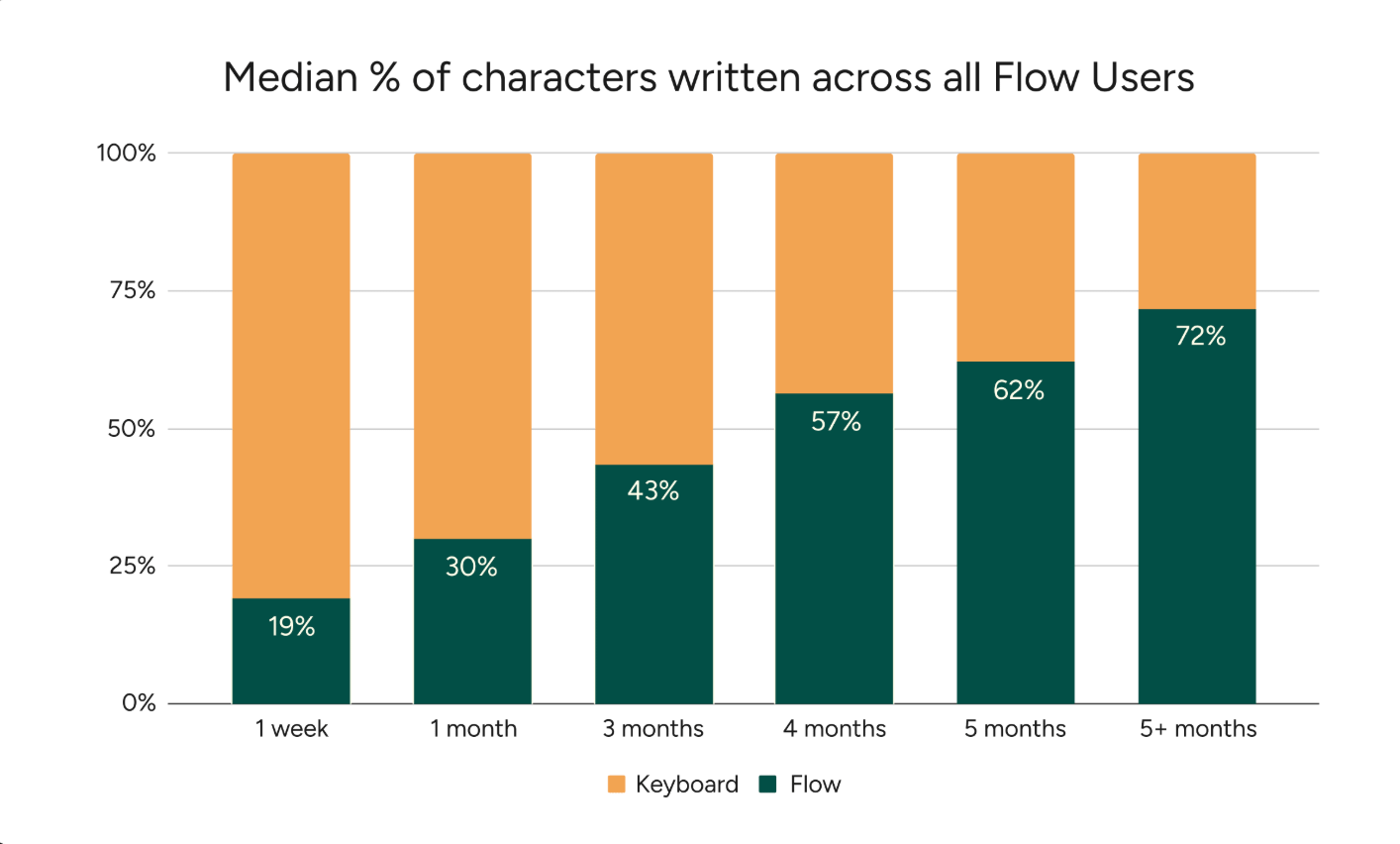
Today we’ll look at how Wispr Flow nails onboarding from copy to UX to the magic moments that drive adoption.
Starting right at the top with the landing page.
Landing page copy (and AB tests 👀)
Wispr Flow’s landing page is incredibly simple. A large four-word headline with a simple wave of words that get corrected on-the-go.
The raw voice input on the left, and the corrected, tidied version on the right.
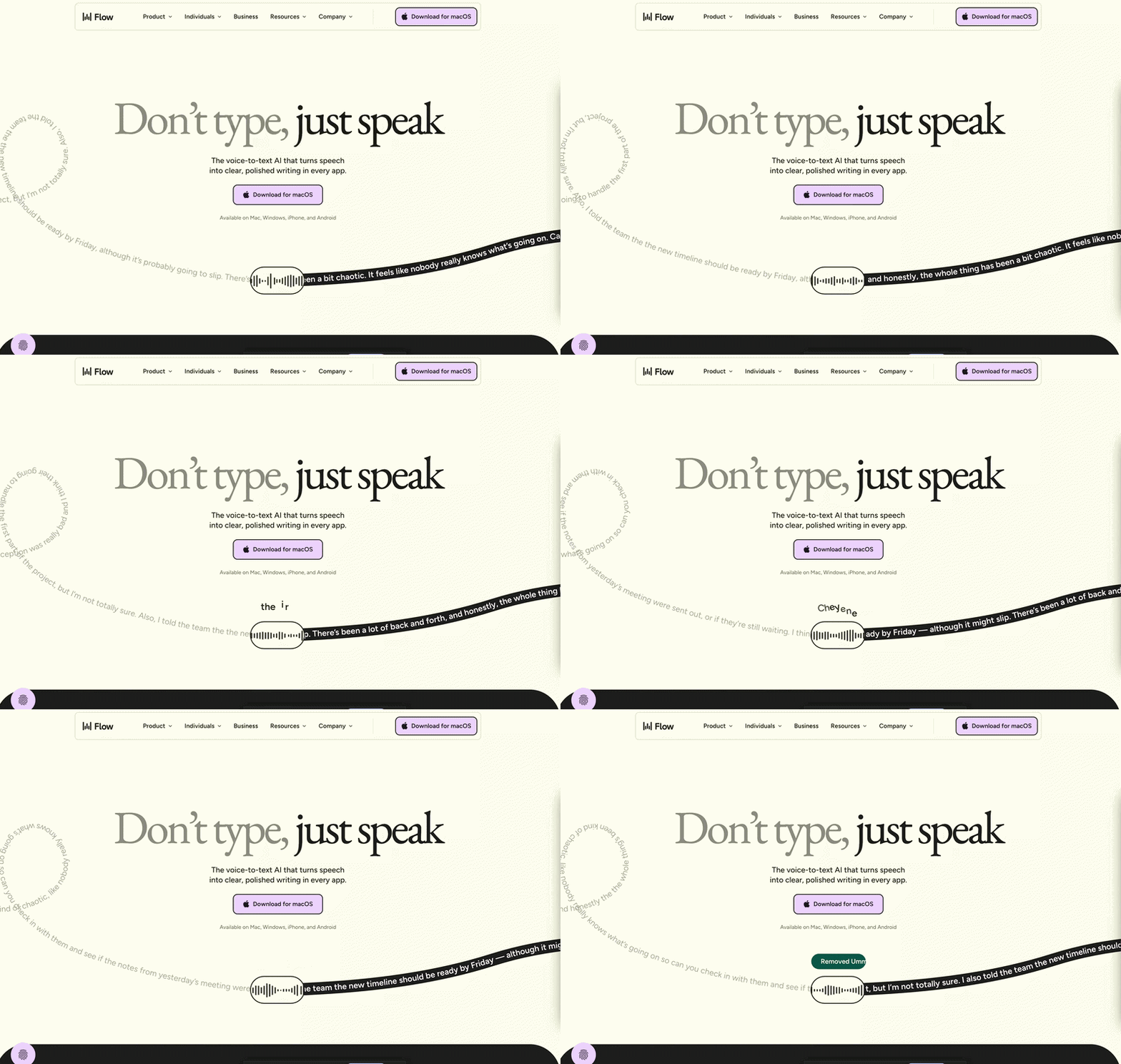
Do you notice anything subtle here?
Every correction in that stream of words is a real pain point with current voice dictation:
Not getting someone’s name right
Struggling to put a question mark in
Long, wordy sentences
Ums, ahhs, and other mumblings
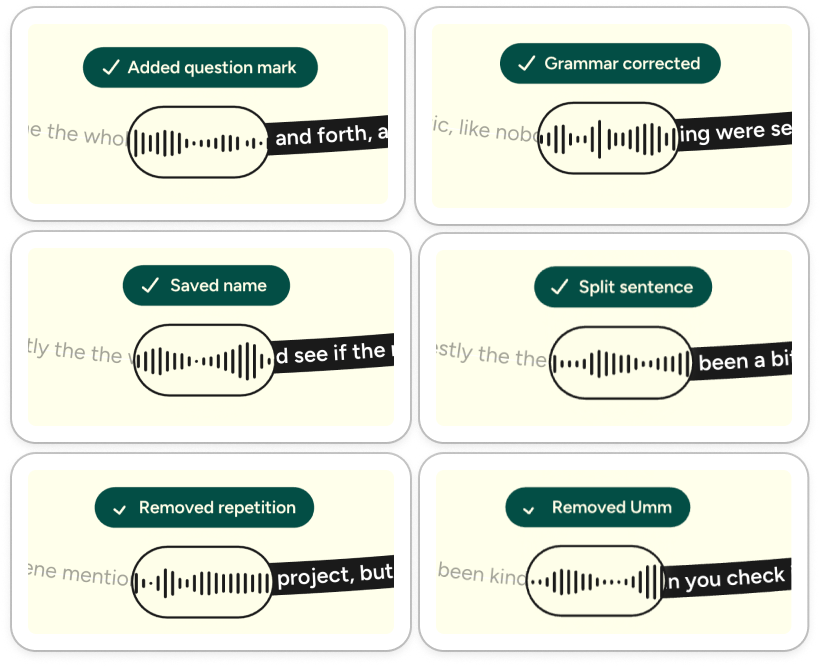
These are the little frustrations that make people subconsciously think “this won’t work for me.”
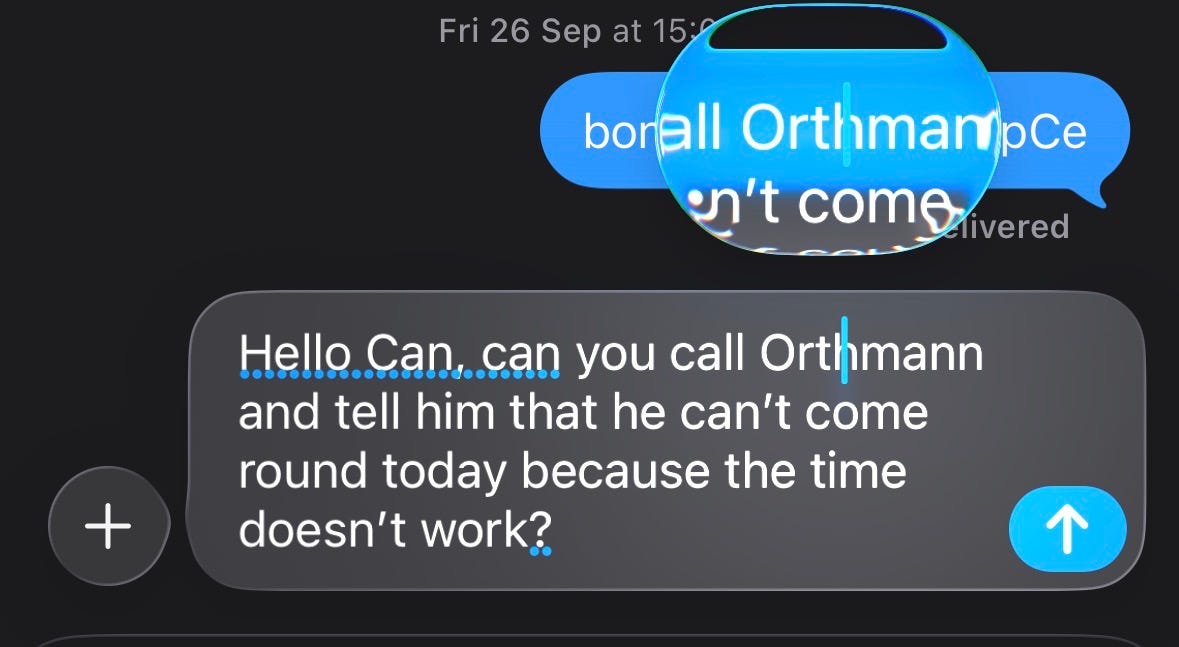
And they’re why, for most products, it’s still faster to type; you spend more time editing the stream of consciousness than you saved by speaking.
See an iMessage here: it didn’t get the name Othman (an edit I’ve changed before), repetition of ‘can’, and to go back to edit is a faff.
Back to the landing page, and while writing this I noticed something.
I started this article in May and took screenshots at the time. When I came back, the copy had changed:
May headline: Say it. It’s done.
June headline: Don’t type, just speak.
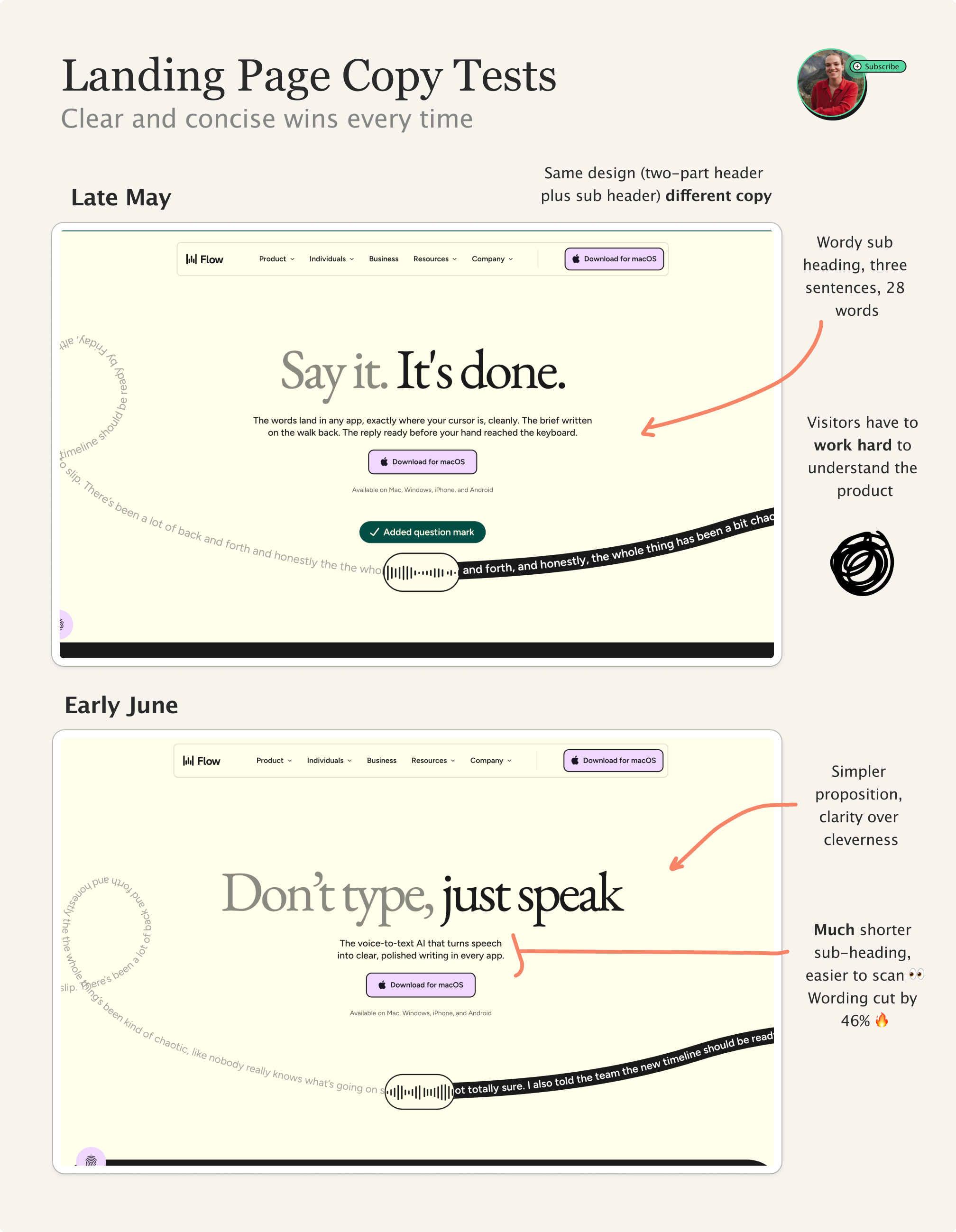
There are a few key things that changed in the test variant compared to the control:
The newer version has 46% fewer words in the sub-header (shorter = better)
The proposition is much clearer: copy is optimizing for being clear over being clever (thank god)
The proposition leads with the action ('Don't type, just speak') instead of the outcome (‘It’s done’) - the new version feels more tangible, grounded and real
The June version names the category overtly: ‘The voice-to-text AI’ whereas the May sub-header assumes you know what it’s talking about (you don’t)
The new headline names the enemy: typing 🗡️
As a result, visitors have to work much less hard to understand what the hell it’s about. Less poetry more category definition 🔥
It’s a subtle change and involves zero design edits, but it has a huge impact.
It’s also a very clean AB test - the team will know exactly what drove any changes in metrics. Most teams redesign everything at once and learn nothing.
From a landing page that feels ruthless about every word, I’m surprised at what comes next: one of the longest onboarding flows I've seen in a while.
Wispr Flow’s 16-step onboarding
There are five stages to Wispr Flow’s onboarding: signup > permissions > setup > learn > personalize

In reality it’s 16 steps, which takes me 8 minutes to complete.
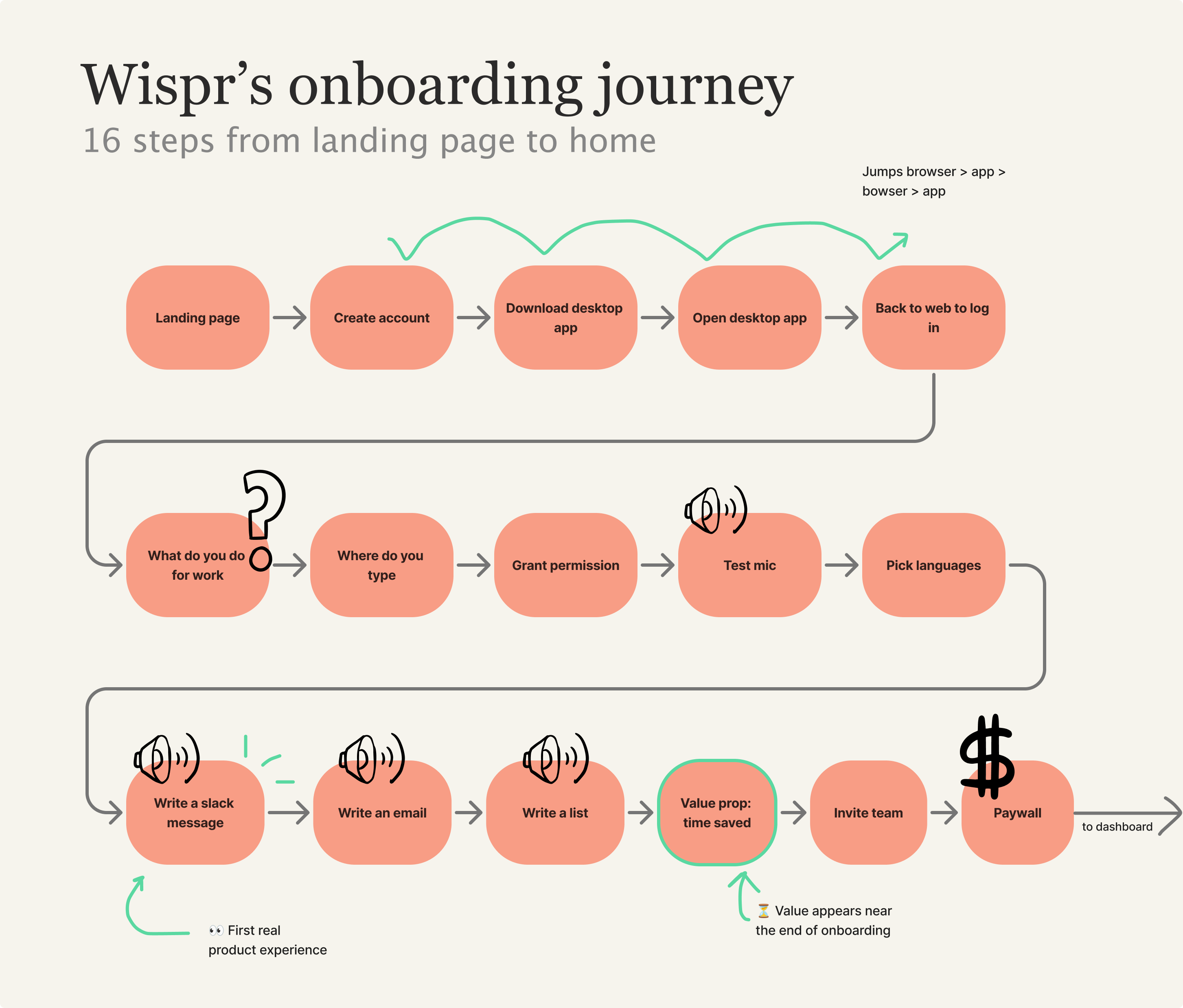
The strange thing is that it never felt long.
Why?
Well, none of this onboarding is really onboarding - every screen is answering a question you haven’t asked.
Take the workflow question;
Where do you spend time typing?
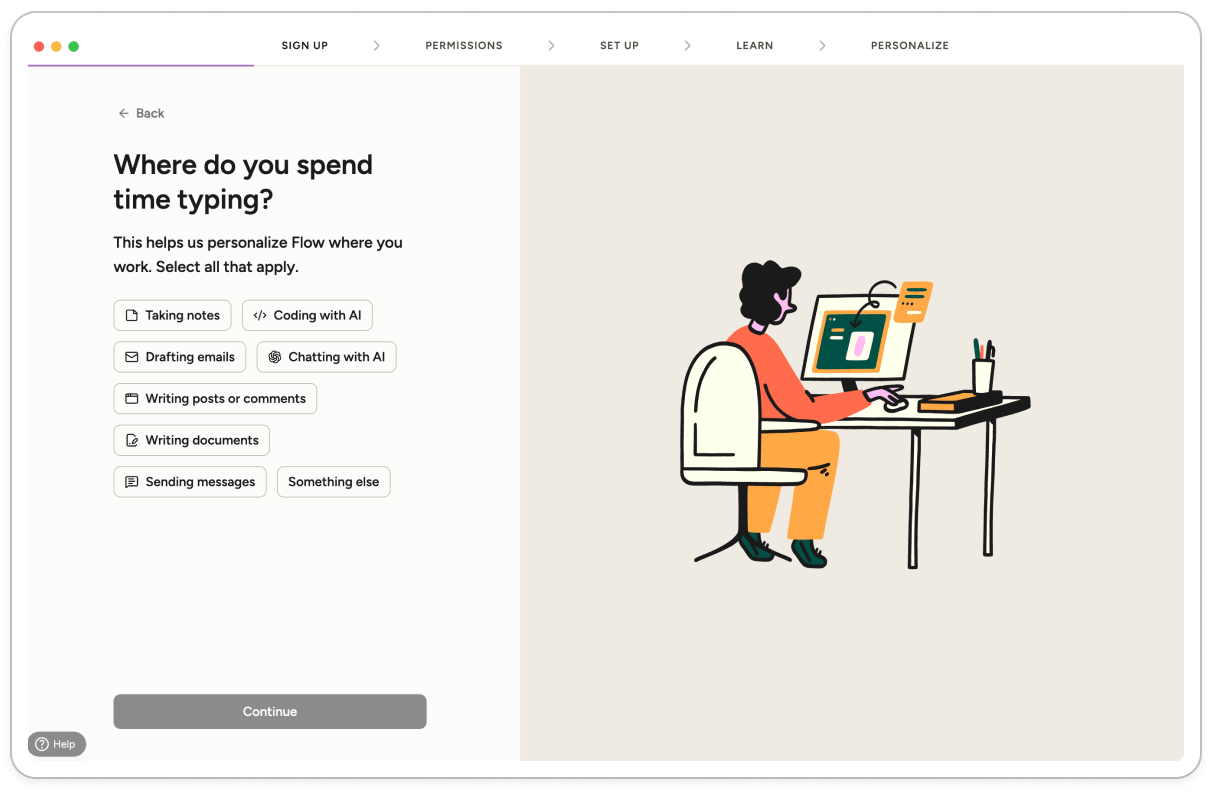
Looks like a setup question. Actually it's teaching you Flow works in your email, your Slack, your docs. It’s showing breadth of use cases.
This carries on…
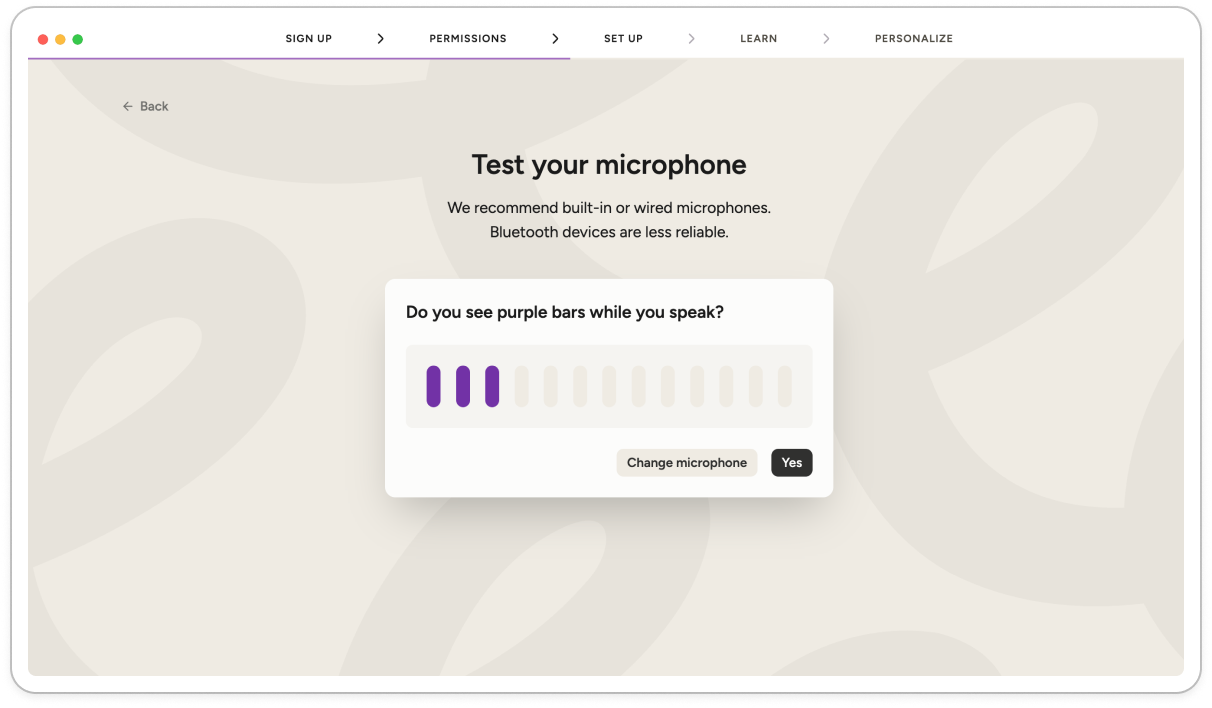
Test your microphone → answers ‘will this work with my mic?’
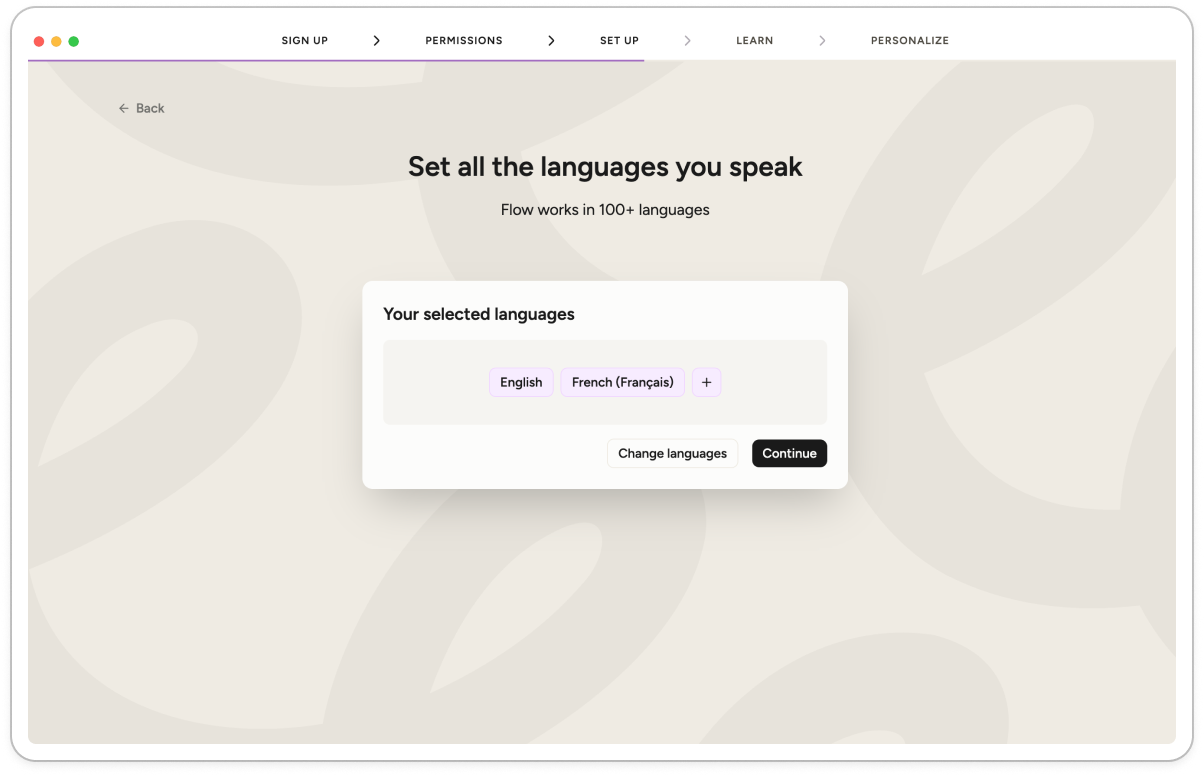
Set all languages you speak → answers ‘will this capture all my languages?’
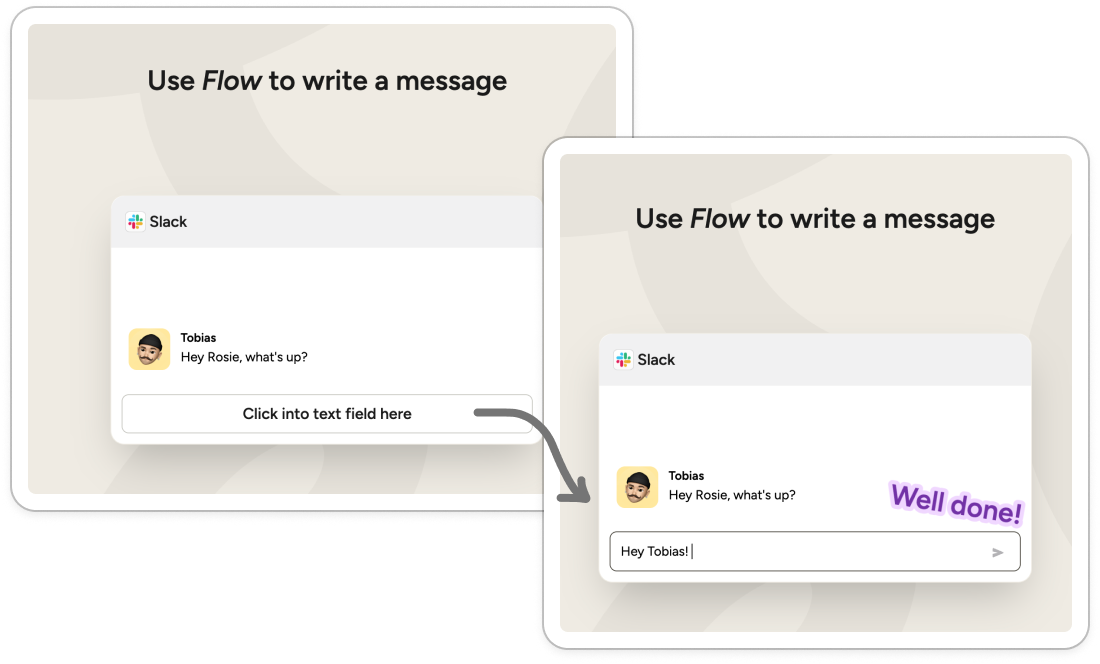
Test in a Slack message → answers ‘will this work where I work?’
Write an email → answers ‘will this look professional and formatted in an email?’
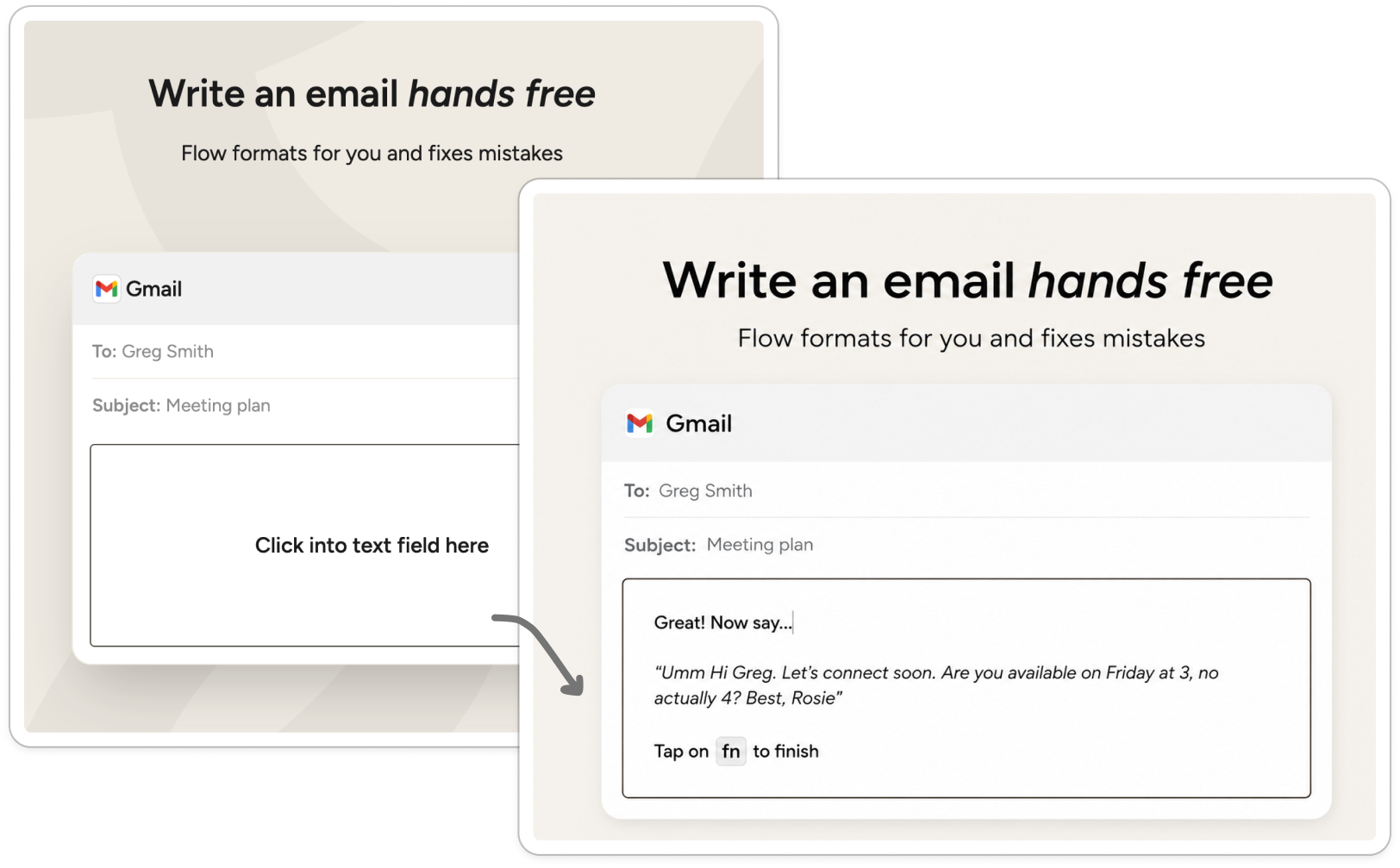
Notice the script:
“Umm Hi Greg. Let’s connect soon. Are you available on Friday at 3, no actually 4? Best, Rosie”
The result I get is a perfectly formatted email:
Hi Greg,
Let’s connect soon. Are you available at 4 on Friday?
Best,
Rosie
It's the landing page demo again: no Umm, right name, no repetition.
The formatting feature is taken one step further in the next screen.
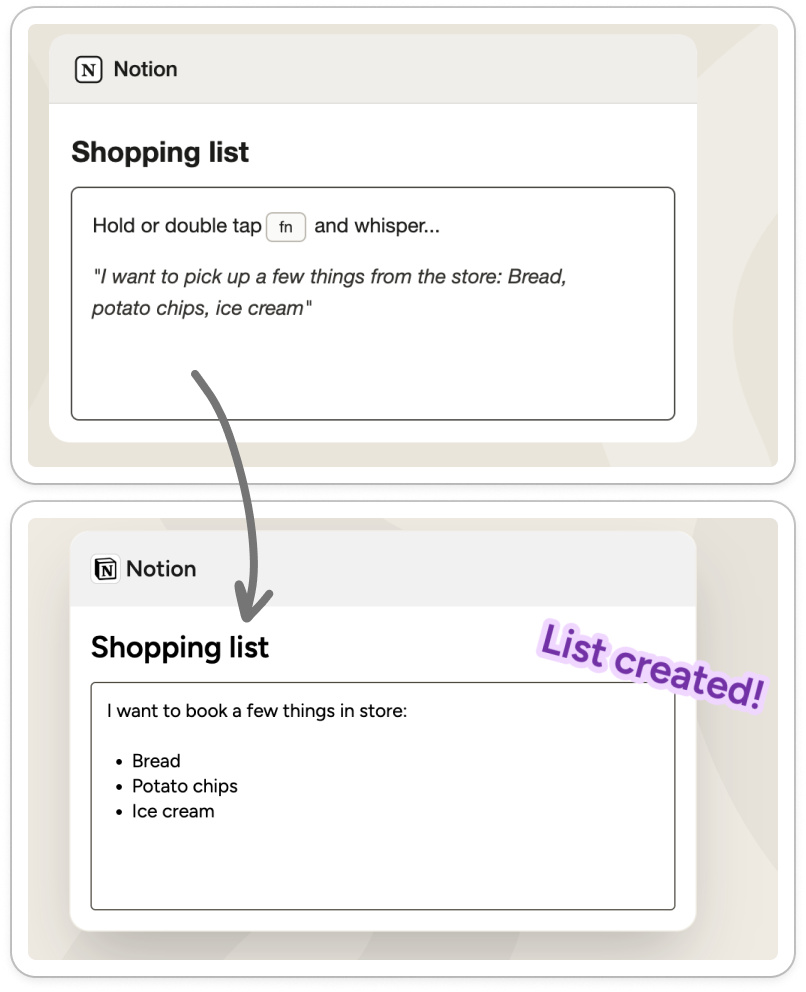
Notice the little detail of where the list is located: Notion. The Notion logo top left reiterates that this tool works across your workflow.
This flow is so impressive.
When you have a product that needs to create behaviour change doubt and hesitation are the enemy.
Hence why every onboarding step removes one doubt.
The interesting thing is that the entire customer journey is one giant exercise in showing, never telling.
Not just showing though, doing.
Wispr Flow’s first aha moments
Zooming out from the copy and product marketing, I realized that before onboarding ended, I'd spoken into the mic four times.
That’s four more times than I’d spoken to my laptop all month (not on a call, ofc).
That’s a lot of friction. But it’s worth it because it’s the best way to create behaviour change.
Most teams obsess over onboarding completion. Wispr is clearly optimizing for something else.
I asked James Troughton, Senior Growth Engineer at Fyxer, to explain:
Completion rate is the obvious way to measure onboarding, but it measures the wrong thing, what matters is whether the user has actually used the product and experienced the ‘aha’ moment before they leave the flow. In my experience, the fear of extra steps is misplaced: drop-off stems from unexplained asks, not step count.
We once intentionally added friction by inserting an education screen before a permissions request, and connection rates jumped ~15%. The payoff compounds over time - users who hit the aha moment in their first day or two retain around 4x better than those who don’t. - James, Growth Engineering @ Fyxer
There's a reason hitting the aha moment is so sticky: people learn by doing, not by being told.
A meta analysis of 225 studies of traditional lecturing vs. ‘active’ learning (being more involved vs. just being told, like group work, worksheets etc) found that lecture-only classes had 55% more failures.
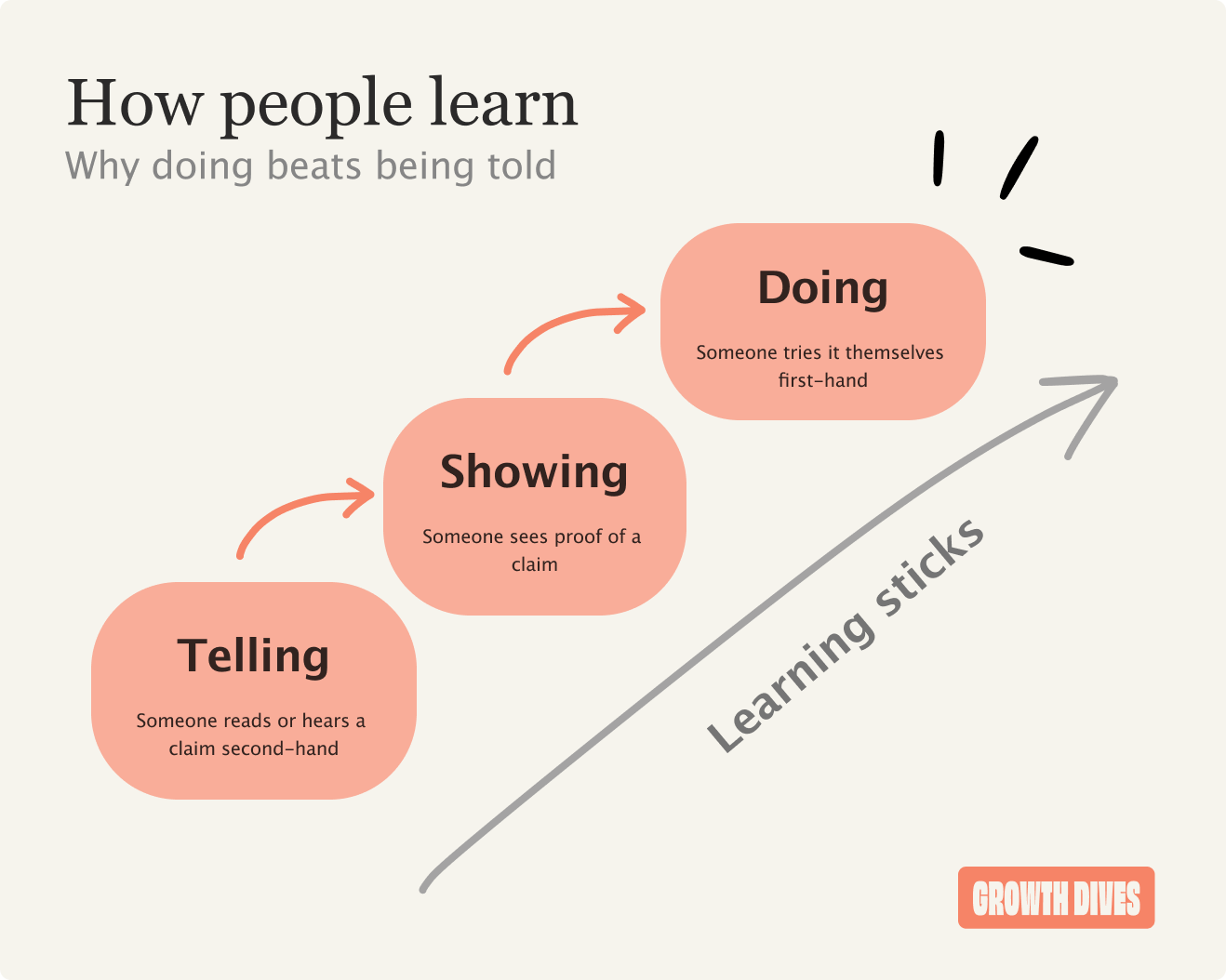
There are two psychological principles at play here:
🧠 The generation effect: you remember information better when you produce it
🧠 The enactment effect: performing an action beats reading about it
The short answer: you have to push people to try the thing, not just tell them about it.
Coming back to the flow, you can see the four moments where I have to speak into my laptop.
What’s interesting here is that they escalate in difficulty:
Mic test: where it doesn’t matter what I say
Slack message: one casual line to an imaginary person
Email: more words, also to an imaginary person
List: many things in a row, the most complex task
Each rep is slightly harder than the last. If Wispr had started with a list, it would have been like cold water in the face.
This flow is training me.
As well as subtly increasing in difficulty, the steps are still incredibly easy.
The dictation text is scripted, the apps are mockups, and success is celebrated instantly ("Well done!", "List created!").
You cannot have a bad first experience - it's been designed for you to win. Early wins build confidence and confident users come back. Yay!
And, perhaps most importantly, the four reps build a habit of using the right key, which means that by the end of onboarding, the physical trigger is in my fingers.
So, whilst yes there’s a lot of friction, it’s all for a purpose. Friction isn't inherently bad, but it is when it’s pointless. With Wispr each step pays you back within seconds - it’s either fun, interesting, surprising, helps you learn or makes you feel tech-savvy.
To conclude, the new way to interact? Or not?
So, back to the question: how do you get someone to hold a laptop to their face in public?
The answer: first by knocking off one doubt at a time. Then by training a new habit.
Specifically, how can onboarding do this? Wispr teaches us six key things:
Name the enemy: For Wispr it’s typing, hence the headline ‘Don’t type, just speak’ sells the new habit, not the tech behind it.
Pick clarity over trying to be clever: Cut the poetry, name the category, make people work less hard. Wispr cut 46% of their sub-header and the page is better for it.
Use every single moment as a chance to reduce doubt: asking the user a question should be an education moment - show what you can do, or why you’re different.
As well as show them, make them do it too: push for the first magic moment in onboarding, make it easy peasy, then repeat it with the difficulty ramping up. Multiple tries build a habit better than one.
Friction is fine if it pays off: 16 steps is a lot, but nobody minds because every step gives you something back within seconds.
Understand the psychological hurdles: If there’s one piece of research you NEED it’s why the current competitors fail. That gives you the copy, the examples, the defaults you need to sneak into the customer’s subconscious.
And as for my office?
Now it’s way more normal in the office to talking into your laptop.
Have people stopped typing? Not yet, no.
But are more people looking odd by whispering into their laptops? Yes.
It just doesn't look bizarre to me anymore.
—
P.S. Have you tried it? Comment to let me know, I’m curious whether the onboarding worked its magic on you too.